产品功能
■ 支持黑白名单
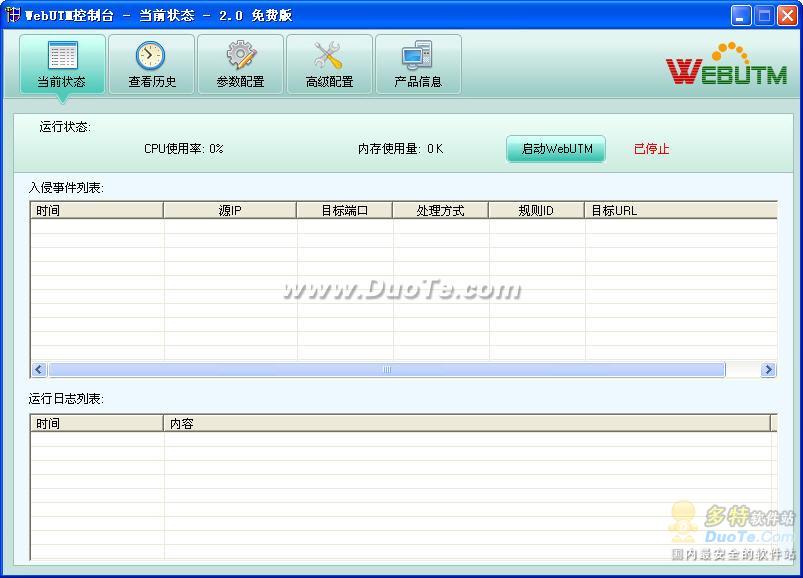
WebUTM支持IP/URL/后缀名/域名黑名单及白名单,可以有效地进行WEB访问控制。
■ 防范常见WEB攻击
通过入侵检测规则,WebUTM可以有效地防范各种常见WEB攻击, 例如SQL注入、XSS、目录浏览、IIS写权限等,还可以有效拦截WVS、JSKY、APPSCAN等WEB漏洞扫描器的扫描。
■ 网站补丁保护
对于新发现的网站漏洞,可以在WebUTM上定义一个补丁规则,阻止该攻击请求到达WEB服务器, 使得网站在WEB漏洞修复前能够正常运行。WebUTM规则辅助工具还可以将WVS扫描器的扫描报告转换为补丁规则, 从而能防范WVS检测出来的各种安全漏洞攻击。
■ 智能阻断
攻击阻断时间根据攻击行为确定。一旦确认攻击行为,自动阻断攻击者的连接一定时限, 如果再次发现该IP攻击行为,阻断该IP访问更长的时限。
■ 网站参数自学习
WebUTM能够以自学习方式学习和分析网站URL的参数类型, 禁止不符合此类型的请求到达WEB服务器。可以全面防范已知的和未定义的攻击,并大大简化管理员的工作量。
■ 区域并发连接限制实现防DDOS
WebUTM支持为特定的IP段设置并发连接数上限,通过对区域并发连接数的限制实现防DDOS。



 其他版本
其他版本 相关攻略
相关攻略 攻击行为存在很多的差异,例如()。挫折不会直接导致人们攻击行为。转移与消除攻击行为的方法有哪些?哪些因素会引发男性之间的攻击行为?()女性也会实施攻击行为,她们的攻击对象通常也是女性。相关的现象有()。以下关于同性攻击行为的性别差异的证据有()。关于攻击行为,主要有哪些理论假设,解释其进化的适应性问题。由于犯错误受到成人批评,将怒气发泄到其他对象身上的攻击行为称为()通过发送大量虚假报文,伪造默认网关IP地址MAC地址,导致上网不稳定。这种攻击行为属于()绝大多数攻击者具有较为明确的目的,以获取利益为攻击意图,其中包含了勒索、虚拟挖矿、黑产活动以及为后续黑产做铺垫的后门权限维持等攻击行为。()
 相关专题
相关专题本专题精选多款适用于Windows 7系统的补丁应用,旨在帮助用户高效解决系统漏洞、提升安全性能及优化用户体验。涵盖从官方更新到第三方安全增强工具,确保您的系统始终保持最新状态,有效抵御各类网络威胁。无论是日常维护还是紧急修复,这里都能找到合适的解决方案,让您的Windows 7系统更加稳定、安全。









手机攻击器在哪里下载?手机攻击器用来对手机进行短信轰炸的工具,手机攻击器全自动发送垃圾短信,只需输入对方手机号即可,低中高特版本,是娱乐整蛊必备工具,手机短信攻击器,2024年度玩家喜爱的软件,你不玩就out了。


本专题精选多款联机补丁APP,涵盖游戏、社交、办公等多个领域,旨在为用户提供便捷的软件更新与优化解决方案。无论您是寻求最新版本的游戏补丁,还是需要稳定可靠的社交应用更新,这里都能满足您的需求。我们定期更新资源,确保每位用户都能获取到最实用、最安全的软件版本。立即探索,享受无缝升级体验。
dll修复进攻专用工具,根据与最齐的DLL数据库查询开展比照,让客户能轻轻松松的寻找被病毒感染毁坏或误删除的DLL文件,一键下载和修复,让您的电脑上在常见故障时自我救赎。修复期内请不要销户,重启,或是关掉电子计算机,修复进行后将会按要求必须重启。修复一些关键的DLL时,必须实际操作服务项目和者实际操作注册表文件,如果有杀毒软件提醒请点一下容许。需要的盆友能够立即点一下下载哦。
本专题汇集了多款系统补丁App,涵盖不同版本,旨在为用户提供便捷的系统更新与修复解决方案。无论是提升系统性能、修复安全漏洞,还是优化用户体验,这些精选App都能满足您的需求。用户可根据设备型号及系统版本,选择最合适的补丁进行安装,确保设备运行流畅、安全可靠。定期检查并安装系统补丁,是维护设备健康、保障数据安全的有效手段。立即下载,体验更稳定的系统环境。








 同类排行
同类排行


 最近更新
最近更新